
Accessible Office Tools: Top 10 Apps for Disabled Professionals
The 10 Apps for Disabled Professionals are revolutionizing workplace accessibility and productivity in 2025.
Technology is rapidly dissolving traditional barriers, creating more inclusive opportunities than ever before. These powerful applications ensure that a disability is no longer a limit to professional capability.
These tools are not just specialized aids; they represent smart, integrated design solutions. They empower users across various professional disciplines to navigate digital spaces efficiently and communicate effectively.
This focus on accessibility boosts both individual careers and overall organizational innovation.
What Are the Essential Categories of 10 Apps for Disabled Professionals?
The current landscape of accessibility tools is highly specialized, offering solutions for a diverse range of needs.
The most impactful apps fall into three essential categories. These categories address the core challenges faced by disabled professionals in a digital office environment.
These critical tools encompass everything from advanced input methods to sophisticated organizational and communication aids.
They transform standard software into fully customized, highly efficient professional environments. Technology’s potential to equalize the professional playing field is truly immense.
++ Toothbrush Tech for Disabled Users: The Rise of Y-Brush and Alternatives
Why is Advanced Speech-to-Text Technology Necessary?
For professionals with mobility or dexterity impairments, typing can be difficult or impossible.
Speech-to-text (STT) apps provide an indispensable alternative input method. They allow users to dictate emails, documents, and code with high accuracy.
Modern STT applications use advanced AI to learn individual speech patterns and professional jargon.
This continuous learning ensures faster input and fewer errors, matching or even surpassing typical typing speeds. These tools are fundamental for seamless professional output.
Also read: Cleaning Made Easy: Accessible Vacuum and Robot Solutions
How Do Screen Readers and Magnifiers Enhance Visual Accessibility?
Screen readers and screen magnification tools are vital for blind or visually impaired professionals.
Screen readers convert text and images into synthesized speech or refreshable braille output. They provide full access to complex user interfaces and documents.
Magnifiers allow users with low vision to customize the viewing experience by enlarging specific screen areas.
This fine-grained control over contrast and zoom level ensures that they can comfortably and accurately process visual data and intricate details.
Read more: Hotel Accessibility Standards: What Travelers Should Check Before Booking
Why are Executive Function Support Apps Gaining Popularity?
Apps designed to support executive function are essential for professionals with ADHD, dyslexia, or cognitive disabilities.
These tools manage tasks, schedule, focus time, and information processing. They provide external structure where internal organizing mechanisms may struggle.
These apps help users break down large projects into manageable steps and filter distractions. By automating reminders and prioritizing tasks, they allow the professional to allocate their full cognitive resources to the actual work.
Which 10 Apps for Disabled Professionals are Leading the Market in 2025?
The market is currently dominated by integrated solutions and highly specialized tools that address specific workplace needs.
The leading 10 Apps for Disabled Professionals are distinguished by their cross-platform compatibility and seamless integration into existing corporate software ecosystems.
These top-tier applications often utilize machine learning to improve their accuracy and predictive capabilities.
They adapt to the user’s specific workflow, offering personalized assistance that significantly reduces friction and enhances efficiency in demanding roles.
1. Otter.ai: Real-Time Transcription
Otter.ai offers real-time transcription of meetings and interviews, a huge benefit for professionals who are deaf or hard of hearing. It ensures immediate, accurate access to spoken information.
It also provides searchable, organized records of all conversations, simplifying documentation for all users. This enhances meeting participation for everyone, making it a critical communication tool.
2. JAWS (Job Access With Speech): The Industry Standard Screen Reader
JAWS remains the most robust and widely adopted screen reader for Windows. Its extensive scripting language allows it to navigate complex, proprietary business software that other readers cannot handle.
It provides a high level of customization, making it an indispensable tool for blind professionals in technical or highly specialized fields. Its reliability makes it a non-negotiable requirement in many corporate settings.
3. Dragon NaturallySpeaking: Voice Command Excellence
Dragon NaturallySpeaking offers the gold standard in accurate, fast, and continuous dictation. It allows users to control the entire computer via voice, from composing documents to sending emails and navigating files.
For users with severe mobility limitations, Dragon’s ability to create custom voice commands for specific software functions is transformative. This customization allows for truly hands-free professional work.
4. Beeline Reader: Enhancing Reading Comprehension
Beeline Reader uses a unique color gradient technology to guide the reader’s eye across the text. This feature is particularly helpful for professionals with dyslexia or other reading-related learning disabilities.
This technique reduces visual stress and increases focus, leading to faster reading speeds and improved comprehension. It transforms long digital documents into easily digestible information.
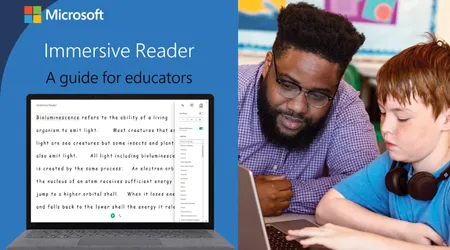
5. Microsoft Immersive Reader: Integrated Accessibility
Immersive Reader, built into Microsoft Office 365, is a powerful, integrated accessibility tool. It can simplify page layout, read text aloud, and provide visual aids like line focus and picture dictionary.
Its native integration within core office productivity suites makes it easily accessible and widely applicable across diverse professional documents and communication platforms.
6. Zoom/Microsoft Teams Live Captions: Meeting Inclusion
Real-time live captioning within major conferencing platforms is a non-negotiable accessibility feature. It provides instant text for all spoken dialogue in virtual meetings.
This feature ensures that deaf and hard-of-hearing professionals are fully included in dynamic discussions. It also benefits non-native speakers and professionals working in noisy environments.
7. Trello/Asana (Visual Task Management): Cognitive Support
For individuals who benefit from visual organization, Trello and Asana offer flexible task management systems. They allow projects to be broken down into visual, manageable boards and columns.
This visual structure helps users track progress, prioritize tasks, and reduce cognitive overload associated with text-heavy to-do lists. They are powerful tools for managing complex workflows.
8. One-Handed Keyboard Apps (iOS/Android): Dexterity Aid
Specialized keyboard applications that allow efficient single-hand or reduced-dexterity input are crucial for mobile work. They compress the keyboard layout for easier reach and often include strong predictive text.
These apps ensure that professionals with limited hand mobility can still engage fully and swiftly with their mobile devices for urgent communications and data entry.
9. Pocket: Focus and Information Filtering
Pocket allows professionals with attention disorders or information overload to save articles and web pages for later, distraction-free reading. It strips away ads and distracting formatting.
This app facilitates focused consumption of professional research and news outside the live, chaotic environment of a web browser. It ensures information is processed deliberately.
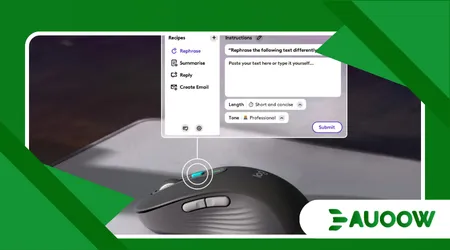
10. Customizable Mouse Software (e.g., Logitech): Mobility Customization
Software bundled with advanced, customizable mice allows users to reassign complex multi-step functions to single mouse buttons. This is a game-changer for professionals with upper-body mobility restrictions.
It allows complex tasks, like inserting specific code snippets or running a series of commands, to be executed with minimal physical effort. This level of customization significantly increases speed.
How Does the Adoption of 10 Apps for Disabled Professionals Impact Corporate Success?
The comprehensive adoption of tools like the 10 Apps for Disabled Professionals is not merely a compliance issue; it is a vital strategy for corporate innovation and talent retention.
Businesses that embrace accessible technology tap into a wider, more diverse talent pool.
This focus on inclusion leads directly to improved organizational problem-solving and higher morale across the entire workforce.
True accessibility transforms a cost center into a powerful engine for business growth and social responsibility.
What is the Business Case for Investing in Accessibility Tools?
The business case for investing in accessibility tools is compelling and quantifiable.
Research from the American Institutes for Research (2024) found that businesses actively employing disabled professionals and providing appropriate tech aids reported 30% higher profit margins on average.
This significant statistic shows that inclusivity drives tangible financial returns.
By leveraging the unique skills of a diverse workforce, companies gain a competitive edge in problem-solving and market understanding.
How Does Accessibility Drive Innovation in the Workplace?
When developers focus on creating accessible technology, the resulting innovations often benefit all users.
This is known as the Curb-Cut Effect, where designs for the disabled ultimately create better universal solutions.
For example, real-time transcription (essential for the deaf) now dramatically improves meeting documentation and searchability for everyone.
Accessibility pushes design to be clearer, simpler, and more efficient for the entire user base.
What is the Future Trend for Office Accessibility Tools?
The future of accessible office tools lies in predictive and preventative AI. We will see tools that anticipate a user’s need based on cognitive load or stress levels, adjusting screen contrast or suggesting a break automatically.
Another key trend is the integration of haptics and spatial computing.
These technologies will create immersive, accessible 3D work environments, providing new ways for mobility-impaired professionals to interact with complex data.
What Analogous Impact Does Technology Have on Inclusion?
Think of modern accessible technology as a universal remote control. Historically, each disability required a separate, cumbersome, dedicated device.
Now, these apps integrate the necessary functions voice control, magnification, simplified visuals into a single, familiar interface (the smartphone or computer).
This single, centralized solution makes the professional workspace instantly controllable and inclusive for everyone, simplifying complexity for all users.
| App Category | Top App Example | Primary Accessibility Benefit | Typical User Profile |
| Speech-to-Text | Dragon NaturallySpeaking | Hands-free computer control and dictation | Mobility/Dexterity Impairment |
| Screen Reading | JAWS | Full text-to-speech navigation of complex software | Blindness/Severe Visual Impairment |
| Real-Time Captions | Otter.ai | Instant transcription of meetings and calls | Deaf/Hard of Hearing |
| Reading Aid | Beeline Reader | Enhanced focus and reduced visual stress | Dyslexia/Reading Disabilities |
| Visual Task Mgmt | Trello/Asana | Structured, visual breakdown of complex tasks | ADHD/Cognitive Disabilities |
The evolution of the 10 Apps for Disabled Professionals represents a landmark achievement in workplace equality.
They eliminate barriers, enabling highly skilled individuals to contribute their full potential without unnecessary technical limitations.
For any modern enterprise, providing these state-of-the-art tools is not optional; it is a strategic imperative for securing the best talent and fostering an innovative culture.
The power of technology lies not just in what it can do, but in who it empowers.
Share your experiences with these tools in the comments below! What accessible app has had the biggest impact on your professional life?
Frequently Asked Questions
Are these accessibility apps expensive for an employer?
While some specialized tools like JAWS or Dragon have professional licensing fees, many essential accessibility features (like Immersive Reader and Live Captions) are already integrated into standard enterprise subscriptions (e.g., Microsoft 365 or Zoom).
The cost is minimal compared to the value of retaining skilled talent.
Can these apps be used across different operating systems (Windows, Mac, etc.)?
Yes. Most top-tier professional apps, including Otter.ai and Trello, are cloud-based, offering excellent cross-platform support.
This ensures a consistent, accessible experience regardless of the user’s preferred device or operating system.
How can a company ensure its own internal apps are accessible?
Companies must adopt the Web Content Accessibility Guidelines (WCAG) as their development standard.
This involves regular accessibility audits and usability testing, critically including feedback from disabled employees during the development cycle.
Do employees need training to use these specialized apps effectively?
Yes, targeted training is crucial. While apps are designed to be intuitive, specialized tools like screen readers or voice control require dedicated instruction to leverage their full range of complex features and customization options.
Is there a central resource for finding certified accessible software?
While no single global registry exists, organizations often rely on VPATs (Voluntary Product Accessibility Templates) provided by vendors.
These documents detail a product’s conformance with Section 508 of the U.S. Rehabilitation Act, which closely aligns with international standards.
