
Why airport self-service systems create barriers for disabled travelers
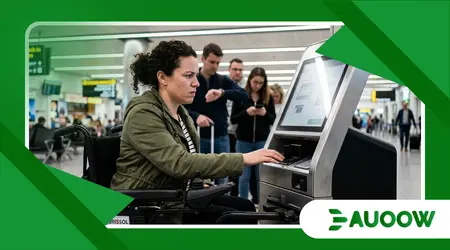
The efficiency of airport self-service systems is often measured by the speed at which a traveler can move from the curb to the gate without ever speaking to another human being.
For Sarah, a graphic designer from Bristol who uses a power wheelchair, that measurement is fundamentally flawed.
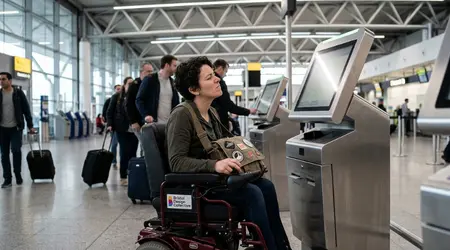
Last Tuesday at a major international hub, Sarah found herself staring at a sleek, brushed-aluminum kiosk designed to scan her passport and print a luggage tag.
The screen was tilted at an angle optimized for a standing adult; from her seated position, the glare of the overhead LED lights turned the interface into a mirror.
When she tried to reach the card slot, her footrest hit the base of the machine, leaving her three inches short of the target.
As the queue behind her grew restless and the automated voice repeatedly chirped “Please insert ID,” the high-tech terminal became a towering monument to exclusion.
This friction is not an accident of technology, but a byproduct of a specific philosophy of design that prioritizes throughput over universal utility.
Essential Points of Analysis
- The Mobility Paradox: How automation designed to save time often creates “time poverty” for disabled travelers.
- The Ergonomic Blind Spot: Why physical kiosk placement and interface height continue to fail accessibility standards.
- The Cognitive Load: The impact of complex, multi-step digital interfaces on neurodivergent passengers.
- Policy vs. Practice: The gap between the Air Carrier Access Act (ACAA) and the reality of terminal floor layouts.
Why does automation often mean regression for accessibility?
There is a detail structural detail that costuma ser ignorado: the transition to automation was sold as a way to “democratize” travel by lowering costs, but it effectively shifted the labor of check-in from trained staff to the passenger.
When a trained airline agent handles a check-in, they possess the cognitive flexibility to adjust to a passenger’s specific needs whether that is speaking louder, reaching over a counter, or manually entering data for someone with limited dexterity.
When we replace that human interaction with airport self-service systems, we replace empathy with an algorithm.
On my reading of this shift, the industry has mistaken “self-service” for “universal service.”
For a traveler with a visual impairment, a touchscreen without haptic feedback or robust screen-reading software isn’t just a minor inconvenience; it is a total barrier.
In the rush to minimize “human touchpoints” during the post-pandemic recovery, airports inadvertently removed the very safety nets that travelers with disabilities rely on to navigate complex environments.
What rarely enters the debate is the “unfunded time mandate” placed on disabled individuals.
While a non-disabled passenger might shave ten minutes off their journey using a kiosk, Sarah and travelers like her often spend twice that time waiting for a “roaming ambassador” to notice they are stuck.
The system is optimized for a narrow “standard” body and a specific set of cognitive abilities, leaving everyone else to negotiate their way back into a process that was supposed to be seamless.
++ The problem with touchscreen kiosks accessibility in public spaces
The architectural ghost of old regulations
It is a mistake to view these digital barriers as something entirely “new.” In fact, they are the digital evolution of old architectural failures.
In the 1990s, we fought for lower counters and wider doorways. Today, the battlefield has shifted to the pixel and the sensor.
When we look at how airport self-service systems are integrated into terminal layouts, the pattern repeats: accessibility is treated as a “plugin” or an afterthought rather than a core requirement.
I have spent years observing how Parliament Hill and Washington D.C. handle these transitions.
There is a tendency among policymakers to assume that if a machine is “ADA compliant” or meets European Standard EN 301 549, the problem is solved.
But compliance on a factory floor is different from accessibility in a crowded, high-stress airport terminal.
A kiosk might have a headphone jack for audio navigation, but if that kiosk is placed in a high-traffic zone where the ambient noise reaches 85 decibels, the audio feature is effectively useless.
The analysis suggests that the disconnect lies in the “siloed” nature of airport operations. The software developers, the hardware manufacturers, and the airport architects rarely sit in the same room.
The result is a beautifully designed interface trapped inside a poorly placed box, governed by a policy that looks good on paper but fails in the frantic minutes before a boarding gate closes.
Also read: Toothbrush Tech for Disabled Users: The Rise of Y-Brush and Alternatives
What actually changed after the shift to total automation?
The move toward “biometric gates” and “touchless” journeys has created a new set of winners and losers in the travel space.
| Feature | Impact on Non-Disabled Travelers | Impact on Disabled Travelers |
| Biometric Face Scanners | Speeds up boarding; no need to show a boarding pass. | Often fails for passengers with tremors or those who cannot align with fixed-height cameras. |
| Touchscreen Kiosks | Intuitive and fast for most users. | Creates barriers for those with visual impairments or limited reach range. |
| Mobile App Integration | Allows for remote check-in and gate updates. | Generally the most accessible option, provided the app follows WCAG 2.1 guidelines. |
| Automated Bag Drops | Removes the need to wait in long agent lines. | Physically demanding; requires lifting and precise placement of heavy items. |
Is the “Touchless Journey” excluding the human touch?
Imagine a traveler with autism navigating a terminal where the primary source of information is a series of flashing, high-contrast digital screens.
In the past, the presence of a manned desk provided a “calm zone” a place to seek clarity. Now, as airport self-service systems become the primary gatekeepers, the cognitive load has increased.
The sheer number of choices, prompts, and time-outs on a digital screen can trigger sensory overload.
There is a subtle irony here. We are using the most advanced technology in human history to perform basic tasks, yet we are making those tasks harder for a significant portion of the population.
When we talk about “inclusive design,” we aren’t just talking about wheelchair ramps; we are talking about the “cognitive ramp.”
This involves simplifying interfaces, providing clear multi-modal feedback (visual, auditory, and haptic), and ensuring that a human being is always within eyesight to intervene when the machine fails to understand the complexity of a human life.
From my perspective, the industry is currently at a crossroads. We can continue to refine these machines to be faster for the “average” user, or we can rethink the architecture of the terminal entirely.
True innovation would be a system that recognizes a passenger’s profile upon arrival and adjusts the height of the kiosk, the language of the interface, and the volume of the audio prompts automatically.
Read more: Cleaning Made Easy: Accessible Vacuum and Robot Solutions
The hidden cost of “Efficiency” for the Squeezed Traveler
When we observe with more attention, we see that the push for airport self-service systems is often driven by a desire to reduce headcount.
While airlines save on salary costs, the “social cost” is offloaded onto the passenger. For a traveler with a disability, this often manifests as a loss of dignity.
Having to ask a stranger to tap a screen for you because you cannot reach it is a regression in independence.
Legislation like the Americans with Disabilities Act and the UK’s Equality Act was designed to ensure that people could move through the world with autonomy.
Technology should be a multiplier of that autonomy, not a detraction from it. We are seeing a slow but steady rise in litigation regarding digital accessibility in travel, and for good reason.
If a website must be accessible by law, why shouldn’t the physical terminal where that website’s “real-world” counterpart exists be held to the same standard?
The most honest analysis suggests that until accessibility is tied to the “Common Use” agreements that airports sign with airlines, little will change.
Airports need to mandate that any third-party technology brought onto the premises whether it is a check-in kiosk or an automated snack robot must be usable by everyone from the moment it is plugged in.
Redefining the “Standard” Passenger
The industry needs to stop treating “the disabled traveler” as a niche edge case. According to the World Health Organization, roughly 15% of the global population lives with some form of disability.
In the context of a busy airport, that isn’t a small minority; it is a massive segment of the customer base. Designing airport self-service systems for this 15% actually makes the experience better for everyone.
A screen that is easy to read in a wheelchair is also easier for a tall person to read without slouching. An interface that is clear for someone with a learning disability is faster for a tired, stressed business traveler to navigate.
The goal isn’t to get rid of technology. The goal is to make technology invisible something that facilitates the journey rather than becoming an obstacle in its own right.
We need to move toward a “Universal Design” model where the machine adapts to the human, rather than forcing the human to contort themselves to meet the machine’s limitations.
Sarah eventually made it to her flight, but only after a stressful twenty-minute ordeal that left her exhausted before the plane even took off.
Her experience is a reminder that in our rush toward a digital future, we must ensure we aren’t leaving the human element and human rights behind on the terminal floor.
FAQ: Navigating Modern Airport Barriers
What should I do if a kiosk is physically unreachable?
Do not hesitate to bypass the kiosk and go directly to the “Special Assistance” or “Full Service” desk.
Under most international regulations, airlines are required to provide an accessible alternative if their automated systems are not usable by a person with a disability.
You should not be charged a “manual handling fee” if the self-service option was inaccessible to you.
Are airports legally required to have accessible kiosks?
Yes, in many jurisdictions. For example, the U.S. Department of Transportation requires that any kiosk installed after 2016 must meet specific accessibility standards, including audio output and tactile input.
In the UK and EU, the European Accessibility Act is pushing for similar mandatory standards across all digital interfaces in transport hubs.
How can I find out which airports are the most accessible?
Many airports now publish “Accessibility Guides” on their websites. Look for terminals that have earned “Captains” or “Acessible Airport” certifications.
Organizations like ACI (Airports Council International) also provide accreditation for hubs that go above and beyond the minimum legal requirements for inclusive design.
Can I use my phone instead of airport kiosks?
In most cases, yes. The mobile app is often the most accessible tool available because it utilizes the built-in accessibility features of your smartphone (like VoiceOver or TalkBack).
Most airlines now allow you to do everything from checking in to tracking your bags through their apps, which can help you avoid the physical barriers of terminal kiosks entirely.
What is the best way to provide feedback on a bad experience?
Document the specific kiosk number or location and file a formal complaint with both the airline and the airport authority.
Digital accessibility is a “hot button” issue for regulators right now, and consistent reporting is the only way to ensure that these structural blind spots are addressed in the next round of terminal upgrades.
